

IIS (Internet Information Services)

Video tutorial
Integrando PERENDER con IIS (Internet Information Services)
Paso 1.
Requisitos previos:
1. Instalar y habilitar el módulo de Reescritura de Dirección URL para IIS (https://www.iis.net/downloads/microsoft/url-rewrite)
2. Instalar y habilitar el módulo de Enrutamiento de Solicitudes de Aplicaciones para IIS (https://www.iis.net/downloads/microsoft/application-request-routing)
1. Instalar y habilitar el módulo de Reescritura de Dirección URL para IIS (https://www.iis.net/downloads/microsoft/url-rewrite)
2. Instalar y habilitar el módulo de Enrutamiento de Solicitudes de Aplicaciones para IIS (https://www.iis.net/downloads/microsoft/application-request-routing)
Paso 2.
1. Abra el Administrador de Internet Information Services (IIS)
2. Seleccione su servidor (A)
3. Doble click en el módulo Reescritura de dirección URL (B)
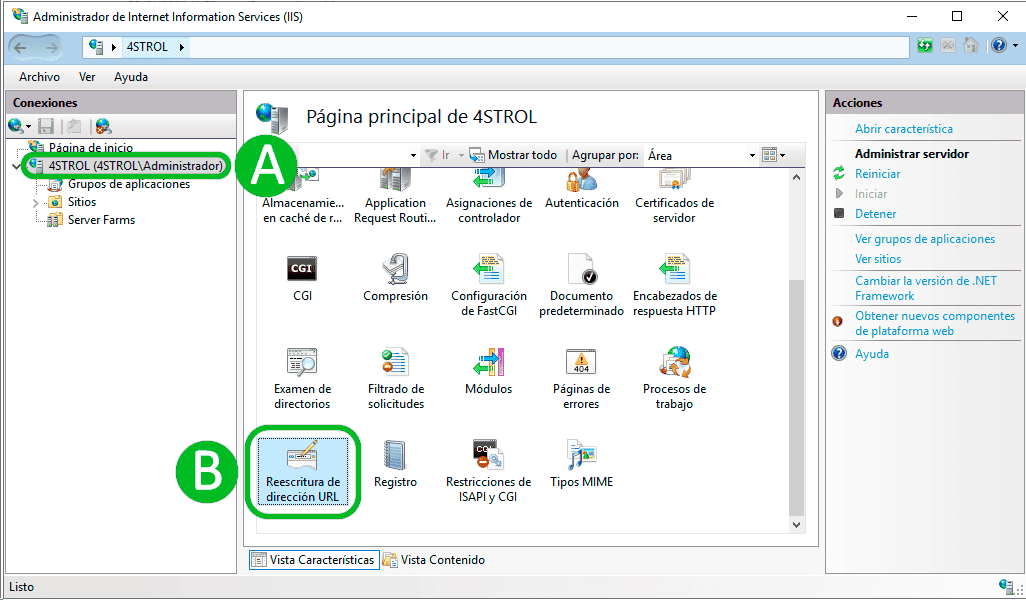
2. Seleccione su servidor (A)
3. Doble click en el módulo Reescritura de dirección URL (B)
Paso 3.
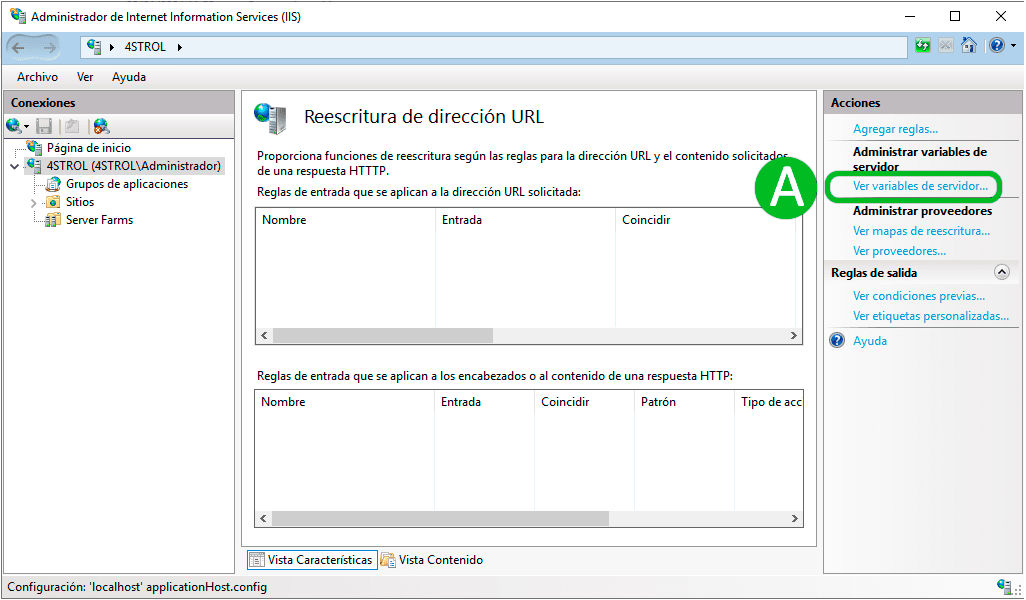
1. Seleccione la opción Ver variebles de servidor... (A)
Paso 4.
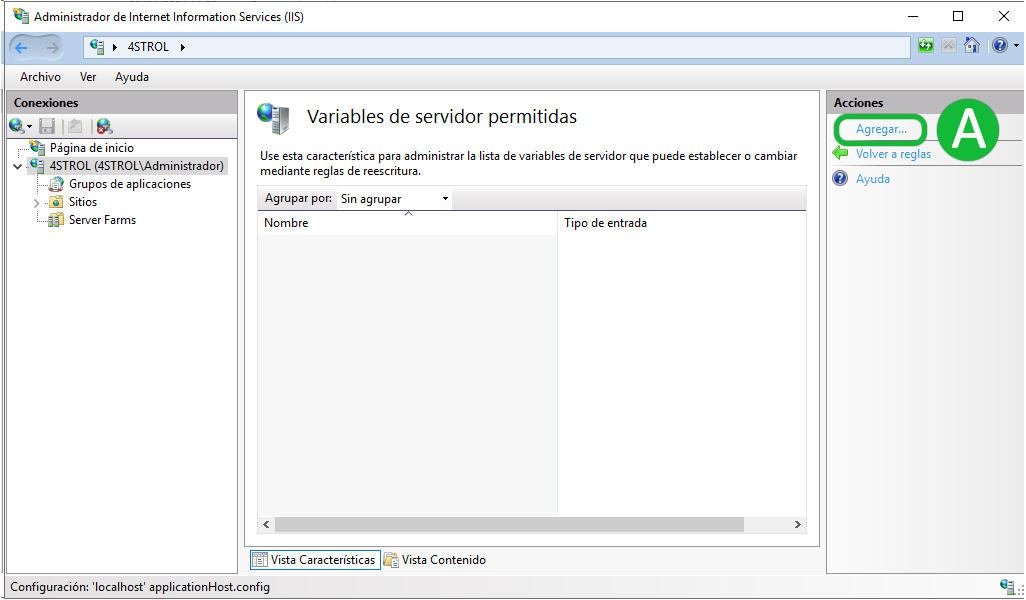
1. Seleccione la opción Agregar... (A)
Paso 5.
Agrege dos variables
1. BOT_AGENT
2. HTTP_Authorization
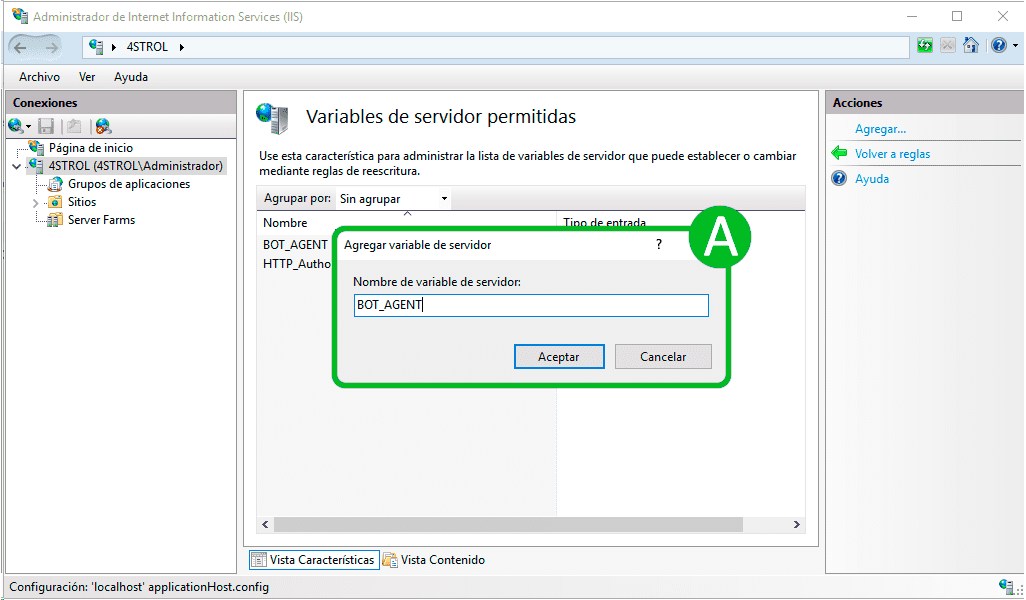
1. BOT_AGENT
2. HTTP_Authorization
Paso 6.
Ahora configuraremos el módulo de Enrutamiento de Solicitudes de Aplicaciones instalado en el Paso 1.
1. Seleccione su servidor (A)
3. Doble click en el módulo Application Request Routing (B)
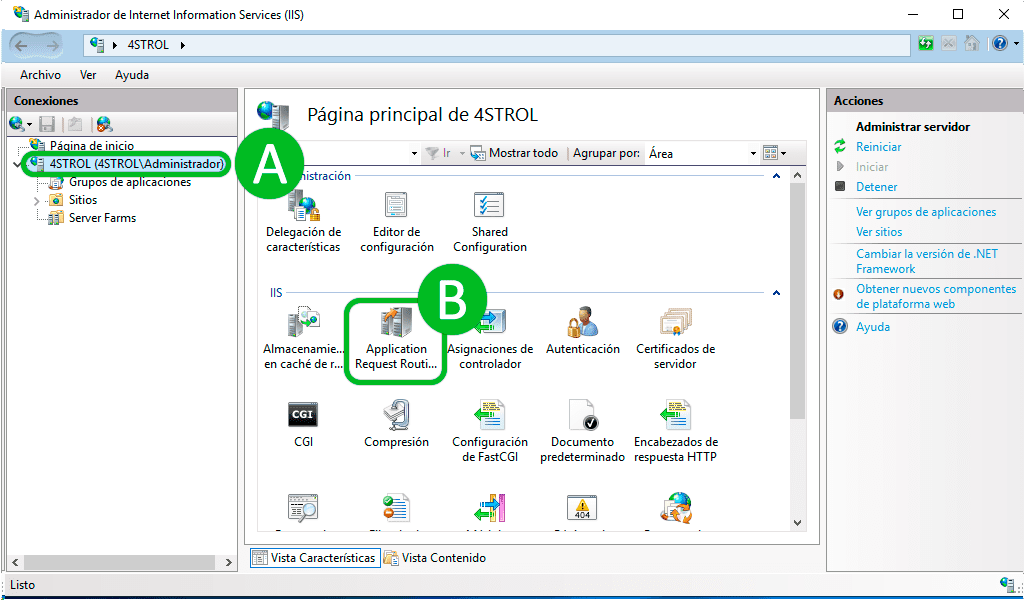
1. Seleccione su servidor (A)
3. Doble click en el módulo Application Request Routing (B)
Paso 7.
1. Seleccione la opción Server Proxy Settings... (A)
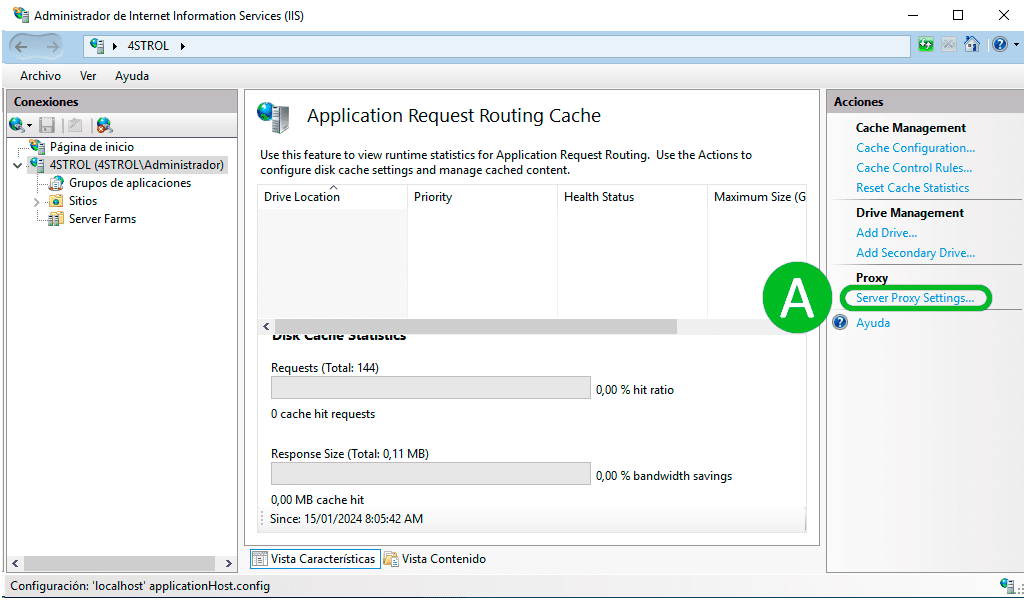
Paso 8.
1. Seleccione la opción Enable proxy (A)
2. Seleccione la opción Applicar (B)
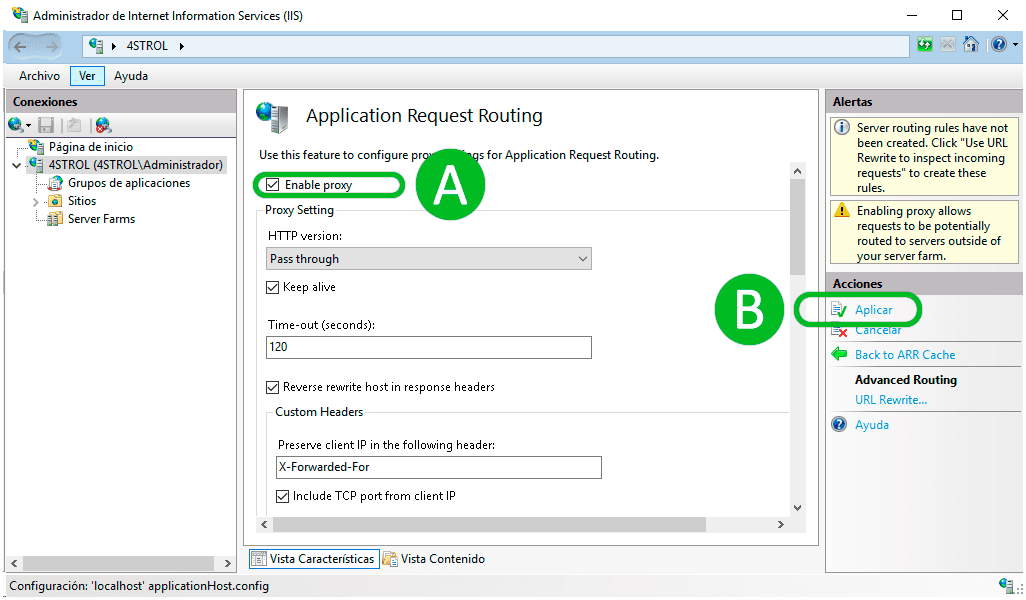
2. Seleccione la opción Applicar (B)
Paso 9.
1. Diríjase a la ruta donde se aloja su página web
2. Si su página web no cuenta con un fichero web.config créelo y pegue el código proporcionado a continuación.
3. Si su página web ya cuenta con un fichero web.config simplemente agregue la regla PERENDER. Si su web.config tiene otras reglas la regla de PERENDER debe incluirse en el primer lugar.
4. Dentro del código proporcionado reemplace [PERENDER_TOKEN] por su toquen en el dashboard de PERENDER.
Repositorio github en la siguiente dirección https://github.com/perender/perender-iis/blob/main/web.config
2. Si su página web no cuenta con un fichero web.config créelo y pegue el código proporcionado a continuación.
3. Si su página web ya cuenta con un fichero web.config simplemente agregue la regla PERENDER. Si su web.config tiene otras reglas la regla de PERENDER debe incluirse en el primer lugar.
4. Dentro del código proporcionado reemplace [PERENDER_TOKEN] por su toquen en el dashboard de PERENDER.
Repositorio github en la siguiente dirección https://github.com/perender/perender-iis/blob/main/web.config
<?xml version="1.0" encoding="utf-8"?><configuration> <system.webServer> <rewrite> <rules> <rule name="PERENDER" stopProcessing="true"> <match url="(\.js|\.json|\.css|\.xml|\.less|\.png|\.jpg|\.jpeg|\.gif|\.pdf|\.doc|\.txt|\.ico|\.rss|\.zip|\.mp3|\.rar|\.exe|\.wmv|\.avi|\.ppt|\.mpg|\.mpeg|\.tif|\.wav|\.mov|\.psd|\.ai|\.xls|\.mp4|\.m4a|\.swf|\.dat|\.dmg|\.iso|\.flv|\.m4v|\.torrent|\.ttf|\.woff|\.svg|\.webmanifest|\.webp)" negate="true" /> <conditions logicalGrouping="MatchAny" trackAllCaptures="false"> <add input="{HTTP_USER_AGENT}" pattern="(googlebot|bingbot|msnbot|adidxbot|yahoo!\ slurp|qwantify|petalbot|bytespider|sogou\ web\ spider|sogou\ inst\ spider|exabot|seznambot|naverbot|yetibot|yandexbot|yandeximages|yandexaccessibilitybot|perplexity|perplexitybot|oai-searchbot|chatgpt|gptbot|claudebot|cohere-ai|youbot|facebookexternalhit|twitterbot|linkedinbot|embedly|quora\ link\ preview|showyoubot|outbrain|pinterest\/0\.|pinterestbot|slackbot|slackbot-linkexpanding|vkShare|W3C_Validator|w3c-checklink|whatsapp|redditbot|applebot|flipboard|flipboardproxy|flipboardrss|tumblr|bitlybot|skypeuripreview|nuzzel|discordbot|snapchat|viber|mattermost|telegrambot|chrome-lighthouse|lighthouse|google\ page\ speed|siteimprove|serpstatbot|uptimerobot|uptimebot|pingdom|gtmetrix|majestic-12|mj12bot|semrushbot|ahrefsbot|dotbot|screaming\ frog\ seo\ spider|seokicks|rogerbot|360spider|soso|baiduspider-render|bitrix\ link\ preview|xing-contenttabreceiver|integration-test|google-inspectiontool|amazonbot|adsbot-google|googlebot-image|googlebot-news|googlebot-video|facebot|archive.org_bot|paperlibot|dataprovider.com|grapeshotcrawler|zoominfobot|feedly|feedlybot|newsblur|inoreader|ccbot)" /> <add input="{QUERY_STRING}" pattern="_escaped_fragment_" /> </conditions> <action type="Rewrite" url="https://api.perender.com/render?url={HTTP_X_FORWARDED_PROTO}://{HTTP_HOST}{REQUEST_URI}&botAgent={BOT_AGENT}" appendQueryString="false" logRewrittenUrl="true" /> <serverVariables> <set name="BOT_AGENT" value="{C:0}" /> <set name="HTTP_Authorization" value="Bearer [PERENDER_TOKEN]" /> </serverVariables> </rule> </rules> </rewrite> </system.webServer></configuration>